
Association Lobby
Features for associations
Everything an association can use today, and what is being added next.
Voting and board elections
Official votes and the annual election online, following your state's rules, with paper ballots for anyone who wants them.
NewAvailable
Online voting that follows state law
Built-in rules for Florida, California, Texas, Arizona, Nevada, Washington, New Jersey and Virginia, and the strictest common rules everywhere else.
- Owner consent to vote online, with paper ballots for everyone else
- Secret ballots where the law requires them
- Minimum voting periods and device tests
- One vote per unit; tenants don't vote
NewAvailable
Annual board election template
Enter the open seats and the meeting date. Deadlines are worked out from your state's rules, and owners sign up to run on the website.
- Candidates add a photo, a short statement and a one-page information sheet
- First notice emailed to every owner
- No vote when there aren't more candidates than seats
- One press makes the ballot, candidates in last-name order
NewAvailable
Ballots owners understand
Yes or no, pick one, or pick several. Every choice can show a photo with text under it and an attached quote, plus supporting documents for the whole vote.
- Read before you vote: quotes, reserve studies, reports
- Large, clear choices for older owners
- Shows how many are chosen out of the limit
NewAvailable
Confirmations and changeable votes
Owners get an email confirmation with a receipt code for every vote. The board decides whether a vote can be changed until it closes, and state rules decide when it can't.
- Board elections are always final
- Only the latest vote counts when changes are allowed
- Paper and in-person ballots confirmed by email
NewAvailable
Vote categories and past results
The board or property manager files each vote under a category, such as Exterior doors or Landscaping. Owners go back any time to see how past votes in that category turned out.
- Pick a saved category or type a new one
- Filter past votes by category
- Totals only: how a unit voted is never shown
NewAvailable
Turnout and results at a glance
See how many units have voted and how many haven't, split by online, paper and in person, with the list of units still to vote. Hidden from the board where the state requires it.
- Results ranked with the leading choices marked
- Share of ballots cast and of all units
- Downloadable vote record for the official records
For owners and residents
Everything a resident needs in one place, with large type and large buttons for every age.
NewAvailable
Pest control calendar for residents
Residents see visit days on a month calendar, marked signed up, open, or full and closed. Press a day to pick a time and sign up.
NewAvailable
Sign up for pest control online
Pick a time on the exterminator's visit day, say if the technician may come in when nobody is home, and add pets and notes. You get reminders before the visit. The board prints, downloads or emails the list to the vendor.
NewAvailable
Vendors the association uses
The board keeps a vendor list with contact details and private notes, and shares the vendors residents can call. A vendor's contact can also be emailed to one household.
NewAvailable
Weather characters in the newsletter
Each day in the forecast has a small illustrated sun, cloud, rain cloud or storm cloud, so the weekend weather is clear at a glance.
NewAvailable
See new messages at a glance
A red number on Messages in the menu shows how many messages you haven't read yet, on a computer or a phone. It clears as soon as you read them.
NewAvailable
Reserve the clubhouse and other amenities
Owners and tenants pick a day and time on a large calendar and send a request. Taken times show as Reserved, never who booked them. The board or property manager approves each one, and everyone gets an email.
- By the hour, inside the open hours the board sets
- Double bookings are impossible, even at the same moment
- Fees and deposits shown and tracked; online payment coming soon
- A reminder email the day before
NewAvailable
Newsletter, monthly and every weekend
News from the board, dates to know, and what's going on in your own city: local news, events, places to visit and the weekend forecast, found from the association's address. Residents sign up for email themselves.
- Monthly issue plus a short This weekend email
- The board reads and publishes every issue
- Sign-up date and time kept; stop any time
- The assistant answers local questions too
Available
Verified sign-in
Residents enter with their unit number and the email on the association's resident list. No passwords to forget. Emails are never shown.
NewAvailable
Board and staff page
Photos of the board, the property manager and maintenance staff, with the official email each one chooses to share. Everyone can add a photo of themselves.
Available
Report a problem
Residents report an issue with photos, from their phone. They see each update until it's done.
Available
Messages
Group spaces and private messages between residents, the board and managers. Each person picks email alerts: each message, a daily summary, or none.
NewAvailable
Marketplace by category
Neighbors buy, sell and give away things. Each category shows a fan of photos from what's listed in it. When someone is interested, the seller gets a confirmation email right away with the buyer's name, unit, note and a Reply button.
- Furniture, Home and kitchen, Electronics, Bikes and sports, Clothing, Kids, Bags and luggage, Free stuff and Other
- Swipe through each item's photos, like design reviews
- Search and sort by price
- I'm interested opens a private conversation in Messages
- Sellers mark items sale pending, sold or cancelled; interested buyers are told
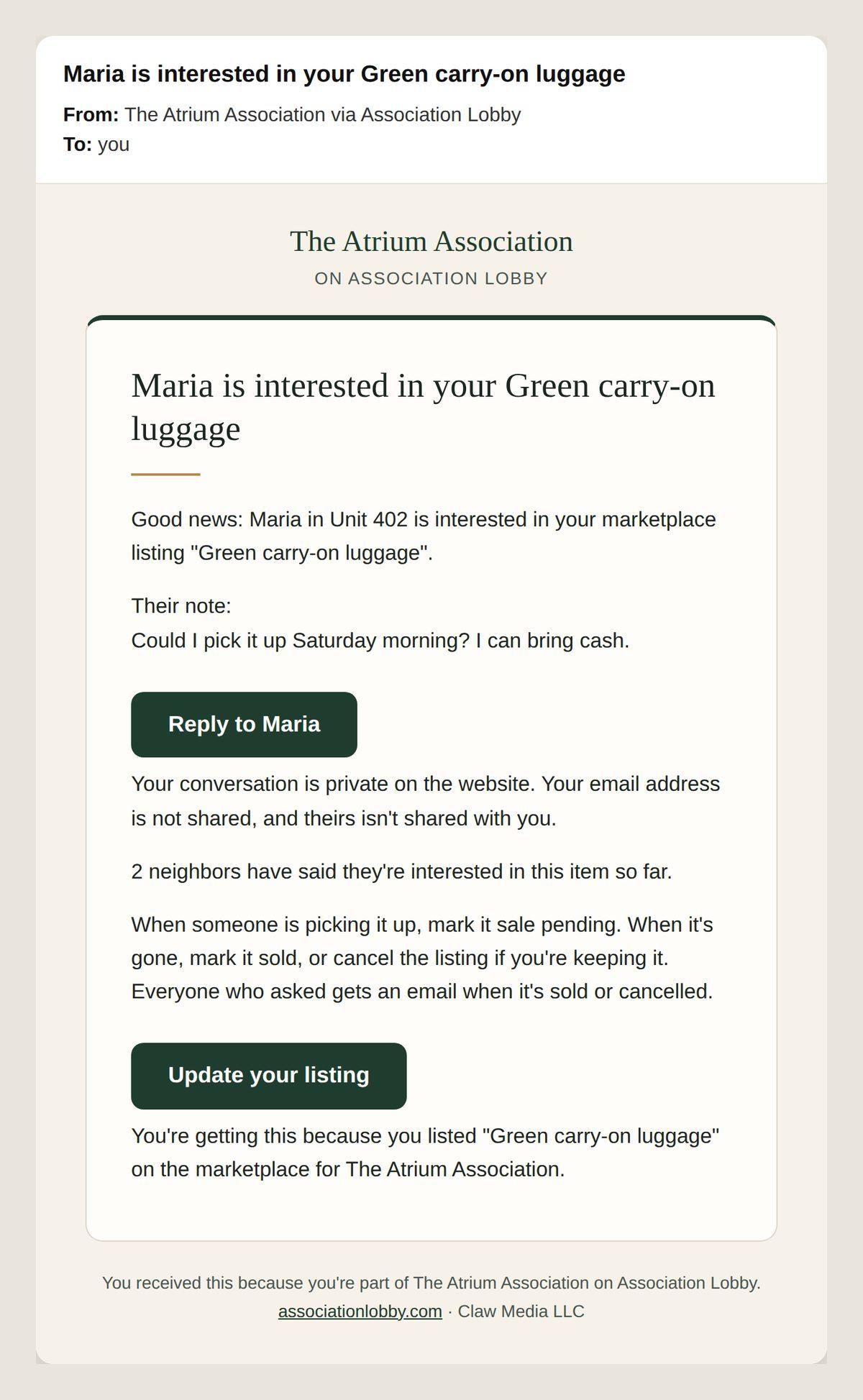
The seller's confirmation email Available
Homes for sale and rent
Owners list their unit for sale or rent by owner, free, with up to 7 photos and the Fair Housing notice.
Available
Official records requests
Owners ask for official records online. The board answers by the legal deadline, releases files privately, and every view is logged.
NewAvailable
Zoom in on photos
Press Zoom on any marketplace, home or design photo to see it full screen. Zoom with + and -, a double tap, the mouse wheel or a pinch, and drag to look around.
NewAvailable
My page
Each unit owner and resident has a private page with their photo and everything they posted: messages, marketplace items with who is interested, their home listing, maintenance requests and design comments.
NewAvailable
Profile photo editor
Choose a photo, then drag it to center your face and zoom with a slider, buttons or a pinch. Only what is inside the circle is saved.
For the board and property managers
The day-to-day work of running the building, without the spreadsheets and email chains.
NewAvailable
Reminders and a morning brief
Households get reminders before their pest control visit or reservation, and the board and property managers get a list of each day ahead, 3 days and 1 day before by default. Board members can also choose a 7 AM brief with this week, what's waiting and what's new.
NewAvailable
Pest control calendar and repeating schedules
See pest control visits on a month calendar with sign-ups for each day. On its own page, enter a schedule once, like the 1st and 3rd Thursday of each month for 6 months or a year, and every visit day is posted with the same time windows. Cancel one day or the rest of the schedule.
Available
Today dashboard
What needs attention, in one view: urgent tickets, unread messages, records requests, upcoming dates, open votes with turnout, reservation requests, and sign-in requests.
Available
Yearly calendar with reminders
Elevator certificates, fire inspections, insurance renewals and more. Reminder emails go to the board and property manager before each date, and again if it's late.
- A next 12 months view
- Reminders 60, 30, 14, 7 and 1 days before
- Maintenance staff can see it
NewAvailable
Maintenance dashboard
Counts for new, in progress, urgent, waiting over a week, unassigned and done this month. Each count opens a list page with those requests in a table, where a request opens in place to assign, start or close it. Charts by month and by place. Every request keeps its photos, history and a closing note the resident sees.
Available
Board and staff roles and the resident list
The board keeps the resident list and offices. Board members, property managers and maintenance staff each see what their job needs.
Available
Bill pay with Life Passion Works
Vendor invoices read and checked by AI, approved by the board online, and paid on time by Life Passion Works (LPWG LLC). Audit-ready records and spending against the budget.
Your association's website
A secure home for the association at its own address.
Available
Its own address
Each association opens at its own name on associationlobby.com. The Atrium is atrium.associationlobby.com.
NewAvailable
Documents and pages
A documents dashboard with a protected board area and a shared resident area, each with folders and subfolders the board creates, counts, and search that looks inside each file and shows the page. Residents never see board folders. Plus pages the board writes: public, community only, or board only.
Available
Easy to read, easy to use
Text at least 16 pixels, buttons at least 44 pixels and strong contrast, with a text-size control. It can be put on a phone's home screen like an app.
Available
A step-by-step user guide
Plain-language help for residents, the board, property managers and maintenance staff.
Design previews and AI help
See a change before the vote, and get help writing and finding answers.
Available
AI design concepts
Turn a photo of the lobby, pool deck or exterior into realistic concepts. A paid add-on. Each result is labeled an AI concept, not a construction drawing.
Available
Photo votes and feedback
Photos are grouped by place. Verified residents vote on each picture and say what they like and what they'd change. A before and after slider is available.
Available
The assistant
Answers questions from your bylaws, rules and state law, and takes people to the right page. Uses AI credits.
Available
AI writing help
Drafts and tidies pages, notices and listing descriptions, and translates to Spanish. It only suggests text; a person reviews it and saves.
Coming next
These aren't available yet.
Coming soon
The association's whole website
Association Lobby can later host the rest of the association's public website at the same address. That part is not available yet.
Coming soon
Board meetings and AI minutes
Start board meetings from the website. The recording becomes draft minutes the secretary approves. A paid add-on. Coming soon.
Coming soon
Inspector of elections sign-in
An outside inspector signs in to oversee a vote where the state requires one. Coming soon.
Coming soon
Dues and special assessments paid online
Owners pay by bank or card through the association's own Stripe account. Spending is read from the association's bank through Plaid, and each special assessment gets its own profit and loss and a Florida step-by-step template. Coming soon.
Coming soon
Homes on the MLS
Listings shared with a partner broker so they reach the MLS. Coming soon.
Bring it to your board
Tell us about your community and we'll walk you through it. Write to sales@associationlobby.com.